
How to Deposit in WinPKR
Add funds to your wallet in under two minutes using JazzCash, Easypaisa, or direct bank transfer. Follow the steps below.
Step-by-Step Deposit Process
Log In to Your Account
Open the app and log in. New users should register first using their phone number.
Go to the Deposit Section
Find "Deposit" in the main menu or your wallet section.
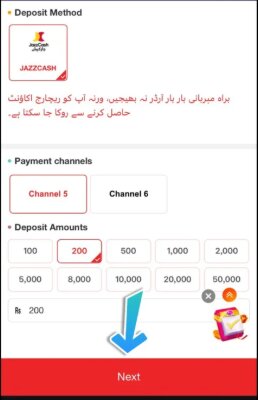
Choose Your Payment Method
Select JazzCash, Easypaisa, or Bank Transfer — whichever is most convenient for you.
Enter the Deposit Amount
Type how much you want to add. Note that a minimum deposit amount usually applies.
Send the Payment
For JazzCash/Easypaisa, send the amount to the number shown in the app. For bank transfer, use the account details provided.
Upload Payment Proof (If Required)
Some methods may ask for a screenshot or transaction ID to confirm your payment faster.
Wait for Balance Update
Once confirmed, your wallet balance will update automatically and you can start playing.
Deposit Method Comparison
Pick the option that works best for you based on speed and convenience.
| Method | Processing Time | Proof Required | Recommended For |
|---|---|---|---|
| JazzCash | Instant – 5 minutes | Sometimes | Fastest deposits |
| Easypaisa | Instant – 5 minutes | Sometimes | Mobile wallet users |
| Bank Transfer | 15 minutes – few hours | Usually yes | Larger deposit amounts |